


See how people use your product
Session Replay is one of the tools that makes your product self-driving: play back sessions to see exactly why something happened so the fix is obvious. The context agents use to debug UI issues and nuanced user behavior in your product, website, or mobile app.
Install with AI in a single prompt
Paste into your terminal or code editor and make AI do the work.
Who uses it?
What does it do?

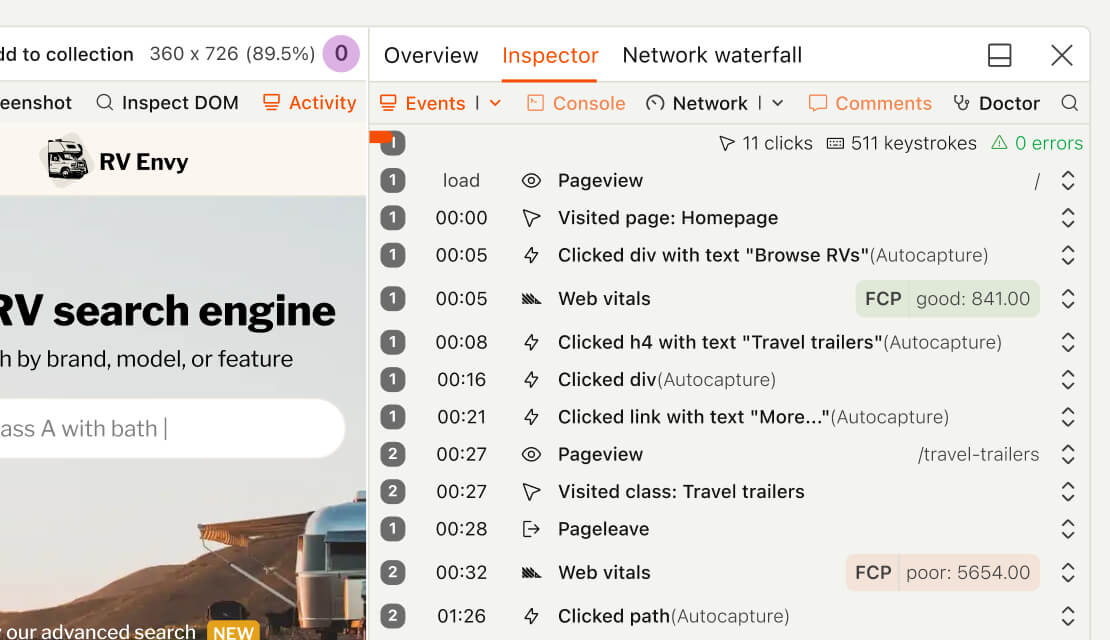
Session Replay records what happens in a user's session — clicks, scrolls, form inputs, page views, network requests, console logs — and plays it back like video. It's like watching a user's screen over their shoulder – it gives the nuance context you only get when you're actually watching them experience your product.
Who is it for?
Session Replay is used across teams depending on your role.
Demo
Here's a video of how PostHog uses Session Replay to support people who use Session Replay. Yes, it's very meta.
No captions available
How do I use it?
There are a few ways to explore Session Replay.
Debug or research without leaving your product editor
PostHog AI can find, watch, and summarize session recordings and you can do it from Cursor, Claude Code, VS Code, or any MCP-compatible agent.
Top features
Event timeline
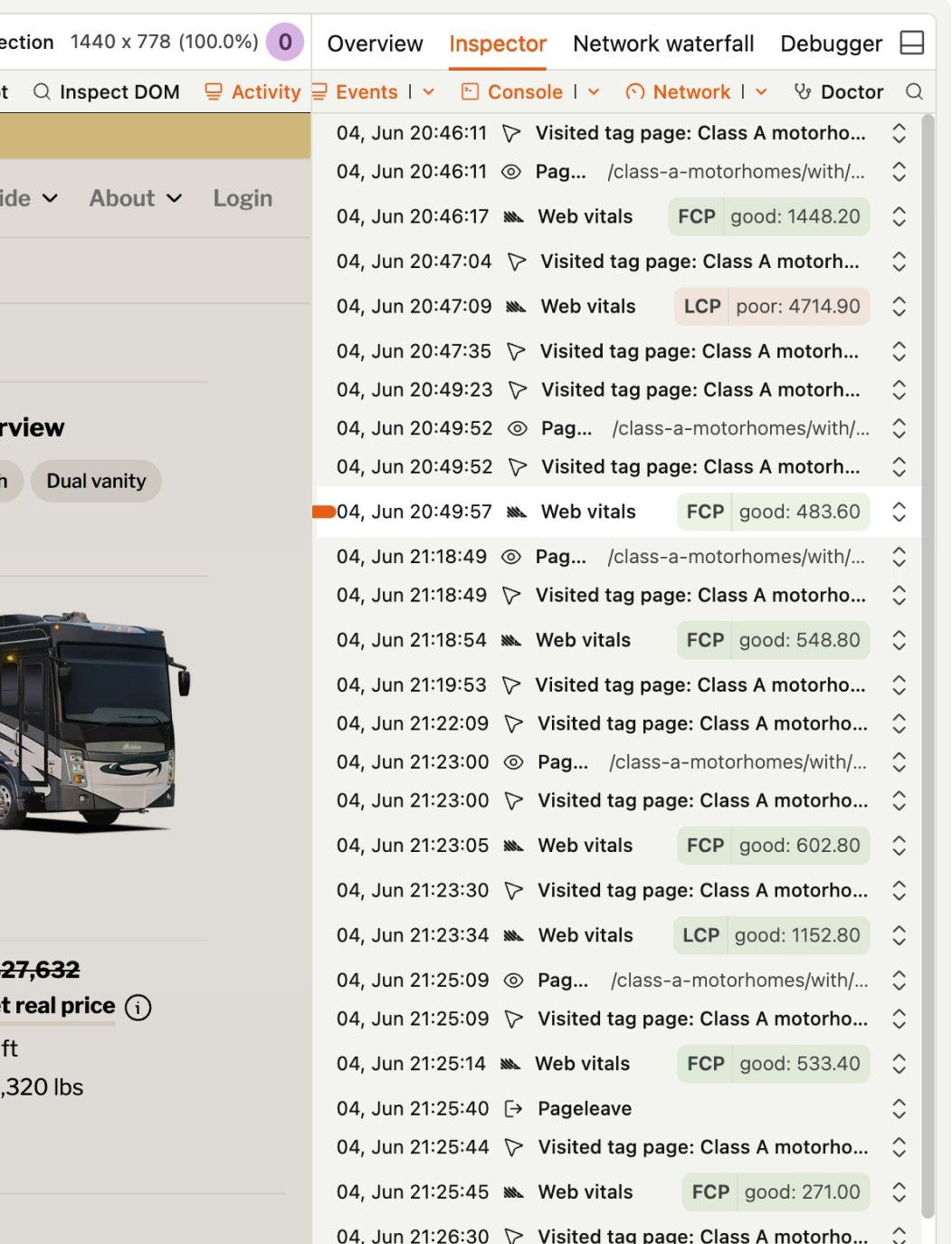
Scrub through an activity log of a user's session to jump directly to parts you want to watch. The timeline shows you a full list of autocapture events (like page views, clicks, scrolling activity), custom events, form interactions, and errors the user may have encountered during their session.
- Event properties
Page URL, user's IP address, the timestamp of the event, etc. - Exception details
Error message, stack trace, and the timestamp of the error. You can also see the full request and response headers. - Web vitals
Performance metrics like FCP, LCP, INP, CLS, and any other acronyms they might think up next
Click on any row to jump to that point in the session, or click the icon view the associated metadata.
AI prompts
Ask PostHog AI to find a specific session or summarize a group of them. Works in PostHog AI (in-app chat), PostHog Code (our AI code editor), and in your product editor (using the MCP).
Findquery-session-recordings-list
- “Find sessions where users dropped off during checkout”
- “Show me sessions from yesterday with rage clicks on /pricing”
- “Find replays where the signup form was abandoned”
- “Show enterprise users who hit a 500 error in the last 24 hours”
- “Find mobile sessions longer than 5 minutes from this week”
- “Pull replays where users clicked the upgrade button but didn't convert”
Summarizesession-recording-summarize
- “Summarize what this user did in their last session”
- “What happened in the session for ticket #4821?”
- “Walk me through what tina@acme.com did before opening this support ticket”
- “Tell me where users typically get stuck in onboarding”
Cluster + investigate
- “What's the most common reason users rage click on /settings?”
- “Cluster yesterday's checkout drop-offs and tell me what they have in common”
- “What are the top 3 patterns in sessions that ended on the pricing page?”
- “Find the funniest thing a user did this week”
Build a playlistsession-recording-playlist-create
- “Make a playlist of every session where someone hit our new pricing page”
- “Save a playlist of replays from users in the experiment B variant”
- “Create a playlist of sessions where users abandoned the signup flow”
Debug a specific user
- “Show me what acme.com users did this week”
- “Pull every replay from user_id 12345 in the last 7 days”
- “Find sessions where this user hit a JS error”
Works with other PostHog products
Use Session Replay with these other PostHog apps to maximize shareholder value.
Works with...
Product Analytics
Jump into a playlist of session recordings directly from any time series in a graph
Feature Flags
See which feature flags are enabled for a user's session
Experiments
Generate a playlist of recordings limited to an A/B test or specific group within a multivariate experiment.
Roadmap
What the Replay Team is considering next. Vote for the things you'd like to see.
Changelog
Recent updates from the Replay Team.
May 2026(2)
- May 28
Flutter SDK now supports Session replay minimum duration
Session Replay minimum duration is now supported in the Flutter SDK (5.24.3+), joining Web (posthog-js 1.291.0+), iOS (3.53.0+), and…
- May 4
Custom product context for session replay AI summaries
Session Replay AI summaries now support custom product context – admins can add free-text context about their product, terminology, and…
February 2026(4)
- Feb 27
Control Session Replay with the React Native SDK
You can now manually control Session Replay recordings with start and stop methods in the React Native SDK. `` ts // Start recording…
- Feb 27
Session Replays for office TVs
Do you have a TV in your office that you’re not using? Play real session recordings on a loop using kiosk mode! This helps your team pick…
- Feb 19
Control Session Replay with Flutter SDK
You can now manually control [Session Replay] recordings with start and stop methods in the Flutter SDK. - startSessionRecording({bool…
- Feb 19
Frustration signals in Session Replay
In Session Replay, we’ve added a new synthetic collection for frustration signals like rage clicks and errors, making it easier to spot…
January 2026(4)
- Jan 23
Link replays to Linear, GitHub, and GitLab issues
Integrate Linear, GitHub, or GitLab with Session Replay. Enable integrations in replay settings and create or link issues directly from the…
- Jan 8
Tab-aware Session Replay
Switch tabs and come back to your replay without losing your place in the video. Session Replay now remembers where you were, so you can…
- Jan 2
Set assignee and labels when sharing to Linear
You can now set assignees and labels when sharing a recording as a Linear issue. Find these under More options.
- Jan 2
Share replays to GitHub Issues
You can now share recordings to GitHub Issues. Find it under the Share menu in any session recording.


December 2025(1)
- Dec 19
Resize session recording player
You can drag to resize the session recording player.
November 2025(1)
- Nov 27
Project feed
Introduced a new Feed tab in the left-hand navigation. In your feed, you’ll find: - AI powered discoveries, like suggested insights,…
Questions?
Answers
There are a few ways you can get answers to specific questions about Session Replay.
- Check the docs
We have an entire docs-wizard dedicated to docs gardening.
- Search the community forums
With over 400 discussions about Session Replay, there's a good chance your answer is already answered!
- Ask PostHog AI
It's an incredibly useful AI chat that understands the product, docs, community questions, our codebase, GitHub issues, and industry knowledge.
- Talk to a human
Dedicated humans are standing by and ready to assist. Best for questions about volume pricing, terms, and sexy legal stuff.
Replay Team
better than GoT s8
This team is 60% pro-pineapple on pizza.
What we do
We help customers understand "the why" behind data and metrics in PostHog. Our tools help customers re-create, analyze, and understand the experience of individual users.
Install
No matter how you build, we've probably got a way to install it.
Web frameworks
Popular



All




















Get started – free
No credit card required. You get the first 5,000 recordings free every month, then pricing starts at $0.005/recording and reduces with volume.